SEO Keyword Research
Overview
Keyword Research helps you discover what your audience is searching for, how much demand each term has, and where the easiest ranking opportunities are. Start from a single seed keyword and SmartlyQ returns hundreds of related keywords with real search data, so you can plan content that actually gets found.
Where to find it
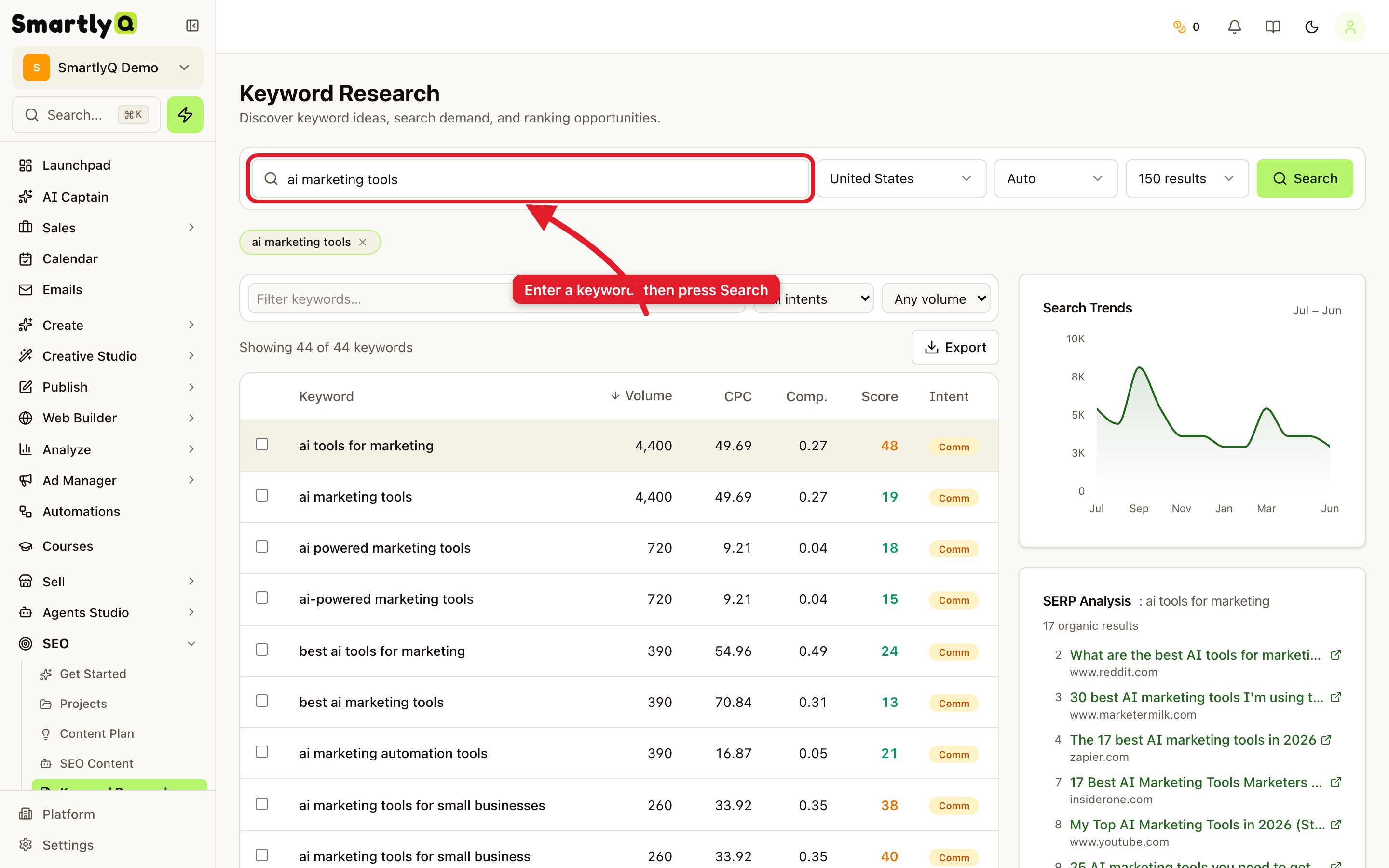
From the sidebar, open SEO > Keyword Research.
How to use it
- Type a seed keyword (for example, "ai marketing tools") into the search box.
- Choose your country and how many results you want.
- Press Search.
SmartlyQ returns a full table of related keywords, each with:
- Volume - average monthly searches.
- CPC - the average cost-per-click if you advertised on it.
- Competition - how contested the term is.
- Score - a difficulty indicator to spot easier wins.
- Intent - whether searchers want to buy, learn, or compare.
On the right you also get a Search Trends chart (seasonality over the year) and a live SERP Analysis showing who currently ranks for the term.
Tips
- Filter and sort to find low-difficulty, high-volume keywords - the sweet spot for new content.
- Watch intent - commercial keywords convert, informational keywords build traffic and authority.
- Export your shortlist and turn the best keywords into content with the Article Generator or SEO Content tools.