AI Presentations: Turn an Idea into a Deck
Overview
AI Presentations turn an idea into a polished, ready-to-edit slide deck in seconds. Describe what you want to present and SmartlyQ generates a complete presentation - structure, slides, and content - which you can then refine in the editor.
Where to find it
From the sidebar, open Creative Studio > Presentations.
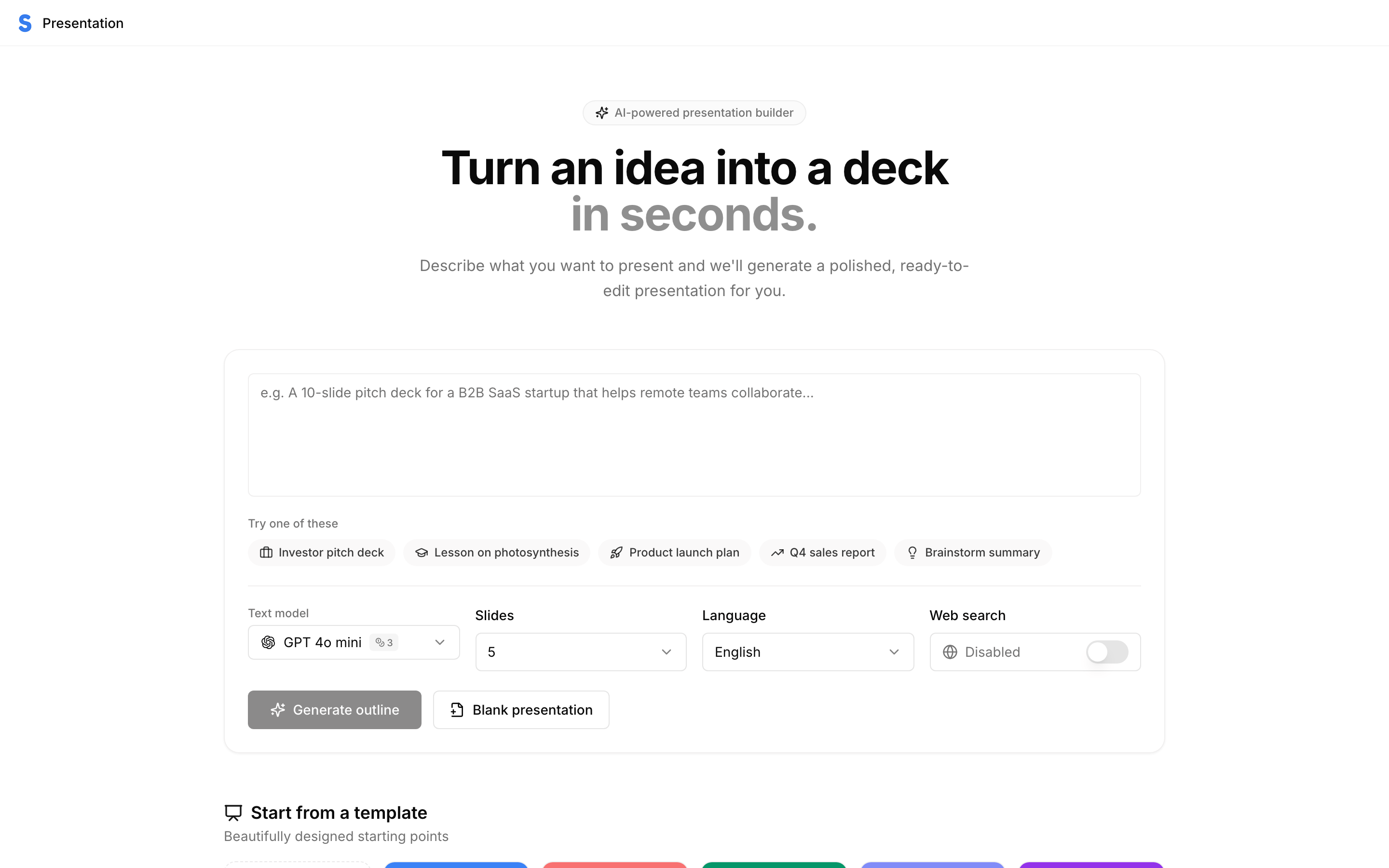
Creating a deck
- Describe your presentation in the prompt box - for example, "A 10-slide pitch deck for a B2B SaaS startup that helps remote teams collaborate." Or pick one of the example prompts to get going.
- Choose your options:
- Slides - how many slides to generate.
- Language - the language of the deck.
- Web search - optionally let the AI research live information to include.
- Click Generate outline to review the structure first, or Blank presentation to start from scratch.
- SmartlyQ builds the deck and opens it in the editor, where you can edit text, swap layouts, and adjust the design.
You can also start from a template using one of the professionally designed starting points.
Tips
- Be specific about audience and purpose - "investor pitch", "internal training", "product launch" - so the tone and structure fit.
- Generate the outline first for longer decks, so you can adjust the flow before the full content is written.
- Keep slide counts reasonable - a tight, focused deck lands better than an overly long one.